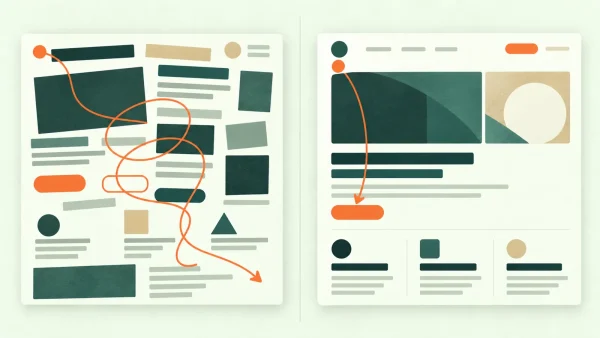
Visual hierarchy in web design is the order in which a page asks to be understood. Before a visitor reads the sentences properly, the design is already suggesting: begin here, notice this next, treat these items as related, and use this action when you are ready.
When that order reflects the visitor’s needs, a complicated page can feel surprisingly easy. When it does not, even good content can feel like a room in which everyone is talking at once.
This is not simply a matter of making the headline enormous. Hierarchy comes from the combined effect of scale, contrast, spacing, position, imagery and repetition. More importantly, it begins with deciding what genuinely deserves attention. Design can express an order; it cannot rescue one that was never decided.
Visual hierarchy answers three questions quickly
On a useful service-business page, a visitor should be able to grasp three things without studying every line:
- What is this page mainly about?
- Which information matters to me now?
- What is the sensible next step?
The answers do not all need to occupy the top ten centimetres of the page. Hierarchy is not a demand to compress an entire business into one hero section. It is a sequence. The opening establishes the subject; later sections provide evidence, detail and reassurance; the main action becomes prominent at the point where someone has enough information to consider it.
This develops one part of my broader explanation of why some websites look professional before you read a word. Professional polish is made from several connected systems. Visual hierarchy is the part that decides which of those systems speaks first.
The content hierarchy comes before the visual hierarchy
It is tempting to open a page builder and start adjusting font sizes. I would begin one step earlier: list what the visitor needs to understand and put it in a deliberate order.
Imagine an accountant’s homepage containing a broad promise, six services, professional qualifications, a testimonial, a tax-deadline notice, a newsletter form, a booking link and three recent articles. All may be legitimate. They are not equally important at the same moment.
The likely hierarchy might be:
- Who the practice helps and what kind of help it provides.
- A clear route into the most relevant services.
- Evidence that the practice is credible and suitable.
- A low-friction way to make contact.
- Timely or deeper material for visitors who need it.
Once that order exists, typography and layout have something meaningful to express. Without it, the newest request tends to become the loudest element. A temporary notice receives a bright banner, every service gets a large card, three buttons become “primary”, and the page slowly loses its centre.
How visual hierarchy in web design is created
Nielsen Norman Group describes visual hierarchy as organising design elements so that the eye encounters them in the intended order of importance. It identifies colour and contrast, scale and grouping as principal tools. In practice, those tools work together rather than acting as isolated tricks.
Scale creates levels
Larger elements usually attract attention before smaller ones. That makes scale useful for a page title, a key figure or an important photograph. The effect depends on difference, however. If the main heading is only fractionally larger than everything below it, the levels may be unclear. If every heading is huge, the page has volume but little hierarchy.
A good type scale creates recognisable roles: page title, section heading, smaller supporting heading and body copy. Each does not need a different typeface or colour. A controlled change in size, weight and spacing is often enough.
Contrast attracts attention
A peach button on a deep green section will advance visually because it differs from its surroundings. The same peach used on every heading, icon, underline and border will soon stop functioning as an accent. Contrast depends on rarity and context, not simply brightness.
Contrast must also remain readable. WCAG 2.2 sets minimum text-contrast ratios of 4.5:1 for ordinary text and 3:1 for large text, with defined exceptions. Passing a numerical check does not automatically make a design comfortable, particularly with very thin type, but it provides an important floor.
Spacing shows what belongs together
Items placed close together are likely to be understood as a group. A heading should usually sit closer to the paragraph it introduces than to the previous section. Form labels should remain visibly attached to their fields. A testimonial’s name should not drift closer to the next testimonial than to its own quotation.
This is why adding borders around everything is rarely the best first response to confusion. Space can establish relationships quietly. Background panels and outlines are useful when a stronger boundary is needed, but too many containers create another layer of competition.
Position and alignment establish the route
Placement affects what is discovered early, but “above the fold” should not become a reason to cram. More useful is to give the opening view a clear subject and continue the story in a logical order.
Alignment helps the eye follow that order. Shared edges connect headings, paragraphs, images and controls into a structure. An intentionally offset element can create emphasis; a collection of almost-aligned elements usually looks accidental.
Images can support or hijack the hierarchy
A large face, a highly saturated photograph or an animated element may dominate a layout regardless of its formal position. That can be useful when the image carries the page’s main meaning. It is a problem when an attractive but generic photograph pulls attention away from the actual offer.
Content choices therefore belong to hierarchy testing. A template may look beautifully balanced with muted placeholder images and fall apart when the real photography arrives.
A clear primary action does not require a hard sell
Visual hierarchy is particularly useful when a business dislikes pushy marketing. A page does not need flashing buttons or artificial urgency. It does need to distinguish the main next step from secondary routes.
For a consultant, the principal action might be “Discuss your project”. A quieter text link could lead to case studies, while an article signup appears later for people who are not ready to enquire. Giving all three the same button style makes the visitor perform the prioritisation that the design should have done.
This is one reason a beautiful homepage can still fail to generate enquiries. Attractive components are not enough if the page never establishes what to notice, why it matters and what happens next.
Mobile design may need a different order, not a smaller one
A desktop composition can show several relationships at once. On a phone, columns stack and only a small portion of the page is visible. The reading order becomes more explicit.
This can expose decisions that a wide screen was concealing. If a two-column section contains explanation on the left and an image on the right, should the image appear before or after the explanation when stacked? If three service cards sit beside one another, which one should come first? Should a secondary button remain near the primary one, or move later in the page?
WCAG’s reflow guidance requires most content to work at a width equivalent to 320 CSS pixels without loss of information or two-dimensional scrolling. That is an accessibility requirement, but it also describes good responsive judgement: content must adapt while its meaning and usable order survive.
Visual order and structural order must agree
A sighted visitor may recognise a large bold line as a heading, but assistive technology needs the structure to exist in the code. WCAG’s guidance on information and relationships says that structure conveyed through presentation should also be programmatically determinable or available in text.
That means using genuine heading levels rather than enlarging ordinary paragraphs, marking up lists as lists, connecting labels to form fields and keeping the reading order sensible. It also means not relying on colour alone to indicate that something is required, selected or urgent.
Clear wording matters too. Descriptive headings and labels help people orient themselves, including people with cognitive or visual disabilities. “What ongoing support includes” is more useful than “More information”, whether somebody is scanning visually or navigating by a list of headings.
Common ways a page loses its hierarchy
- Everything is emphasised. Large type, bold text, accent colours and cards appear everywhere, so none of them can establish priority.
- The newest request becomes the loudest. Notices and promotions accumulate without reconsidering the whole page.
- Decoration outranks meaning. A dramatic photograph or animation receives more attention than the service, evidence or next step.
- Repeated sections all use the same rhythm. Every block has an equally large heading, image and button, producing a long page with no peaks or pauses.
- Desktop balance becomes mobile disorder. The visual arrangement changes, but the stacked reading order is never reviewed.
- Style and structure disagree. Text looks like a heading without being marked as one, or the coded order does not match the visible order.
Five practical ways to test a page
1. Reduce it to a thumbnail
Take a screenshot and view it very small. You will stop reading the copy and start seeing the weight of the page. Is there an obvious beginning? Do the main sections remain distinct?
2. Use the squint or blur test
Blur the screenshot slightly, or simply squint. The technique is crude but useful: dominant shapes and contrast remain while detail disappears. If an unimportant image becomes the strongest object, the hierarchy may be telling the wrong story.
3. Read only the headings and actions
Ignore the paragraphs. Do the headings form a comprehensible outline? Do the buttons make their destinations clear? If this reduced layer is vague, making it larger will not solve the content problem.
4. Check the real mobile order
Use a phone as well as a browser preview. Scroll from the beginning and note what appears first, what interrupts the sequence and whether a sticky element obscures content. Hierarchy is experienced one screenful at a time.
5. Ask someone what the page is asking them to do
Show the page briefly, then remove it. Ask what the business offered, what seemed most important and what action they would take next. This is not a complete usability test, but it can reveal a striking gap between intended and perceived priority.
Improving hierarchy may not require a rebuild
Some pages improve substantially when a few decisions are made consistently: reduce competing button styles, simplify the heading scale, group related material, give important sections more space and move secondary content later.
Other sites have a deeper structural problem. The navigation, page purpose and content priorities may be unclear before the styling begins. That is why I prefer to diagnose an existing website before recommending a rebuild. A hierarchy problem might need a careful refresh, a content restructure or a new design system; it does not automatically require demolition.
If your website contains the right information but seems to make the wrong things loud, a focused website review can help identify where the visual order and the visitor’s needs have drifted apart.
Sources and further reading
- Visual Hierarchy in UX: Definition — Nielsen Norman Group
- Understanding SC 1.3.1: Info and Relationships — W3C WAI
- Understanding SC 1.4.3: Contrast (Minimum) — W3C WAI
- Understanding SC 1.4.10: Reflow — W3C WAI
- Understanding SC 2.4.6: Headings and Labels — W3C WAI
Important note
This article provides general information and professional commentary. It is not advice tailored to your particular business, website or circumstances, and it should not be treated as legal, financial, privacy, accessibility, cybersecurity or other specialist advice. Any opinions are my own professional judgement based on the information available when the article was researched.
Products, prices, services, software and official guidance can change. External links are provided for reference; I do not control third-party websites and cannot guarantee their continuing availability, accuracy or content. A link does not imply endorsement of everything published by that source.
Check current official information before making an important decision. Test technical changes safely, keep a verified backup, and obtain appropriately qualified advice where the consequences warrant it. Any sponsorship, free product, affiliate link or other commercial relationship relevant to the article will be clearly disclosed.